Nuxt Lifecycle
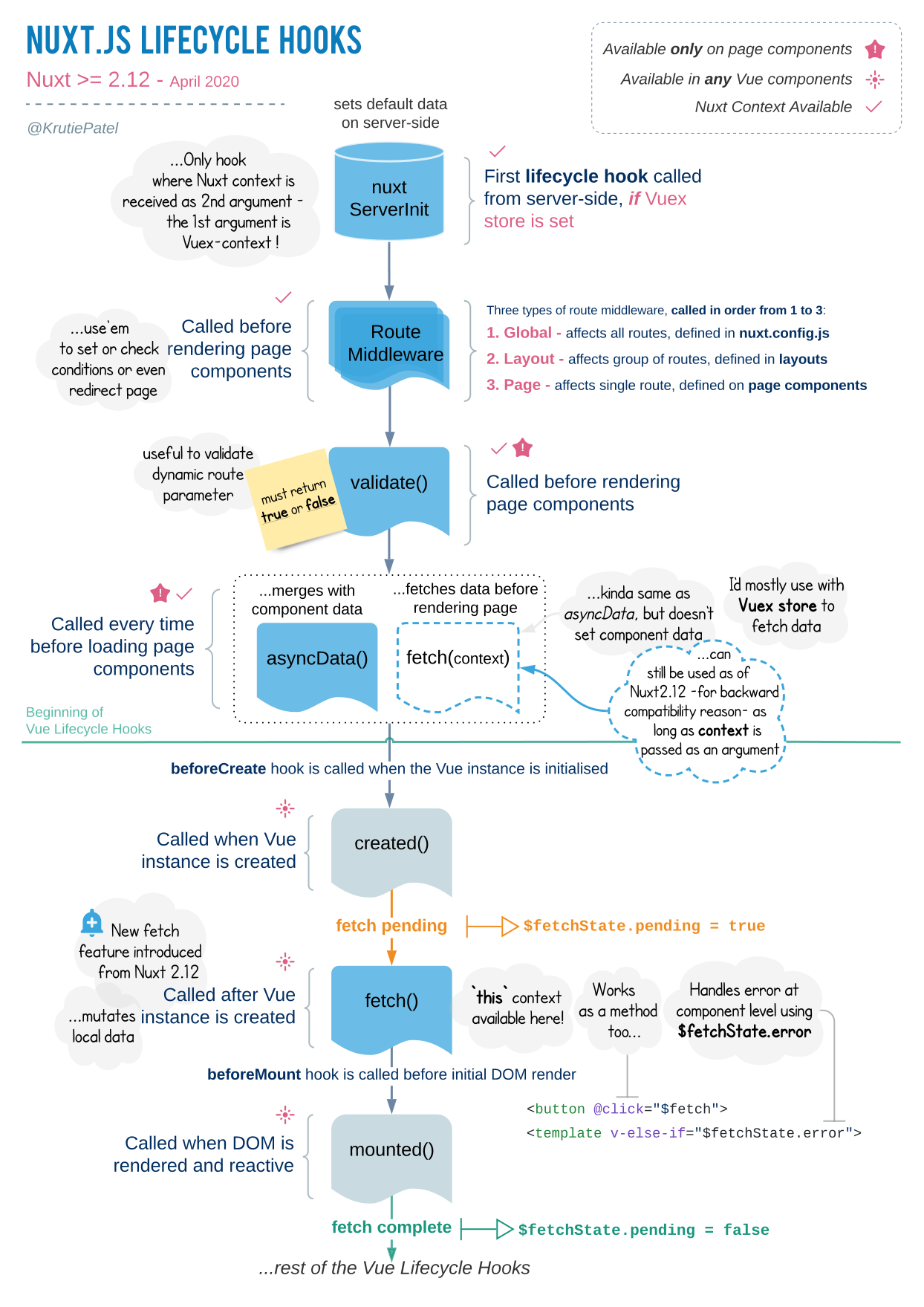
The goal of this chapter is to give you a high-level overview of the different parts of the framework, their order of execution and how they work together.
The Nuxt lifecycle describes what happens after the build phase, where your application is bundled, chunked and minified. What happens after this phase depends on whether you have server-side rendering enabled or not. And if you do, it further depends on the type of server-side rendering you have chosen:
Dynamic SSR (nuxt start)
or Static Site Generation (nuxt generate).
Lifecycle
Server
For SSR, these steps will be executed for every initial request to your app
- The server starts (
nuxt start)
When using static site generation, the server steps are only executed on build time, but once for every page that will be generated
- The generation process starts (
nuxt generate) - Nuxt hooks
- serverMiddleware
Server-side Nuxt plugins
- in order as defined in nuxt.config.js
nuxtServerInit
- Vuex action that is called only on server-side to pre-populate the store
First argument is the Vuex context, second argument is the Nuxt context
- Dispatch other actions from here → only "entry point" for subsequent store actions on server-side
- can only be defined in
store/index.js
Middleware
- Global middleware
- Layout middleware
- Route middleware
- asyncData
- beforeCreate (Vue lifecycle method)
- created (Vue lifecycle method)
- The new fetch (top to bottom, siblings = parallel)
- Serialization of state (
render:routeContextNuxt hook) - the HTML rendering happens (
render:routeNuxt hook) render:routeDonehook when HTML has been sent to the browsergenerate:beforeNuxt hookHTML files are generated
Full static generation
- e.g. static payloads are extracted
generate:page(HTML editable)generate:routeCreated(Route generated)
generate:donewhen all HTML files have been generated
Client
This part of the lifecycle is fully executed in the browser, no matter which Nuxt mode you've chosen.
- Receives the HTML
- Loading assets (e.g. JavaScript)
client-side Nuxt plugin
- in order as defined in nuxt.config.js
- Vue Hydration
Middleware
- Global middleware
- Layout middleware
- Route middleware
- asyncData (blocking)
- beforeCreate (Vue lifecycle method)
- created (Vue lifecycle method)
- The new fetch (top to bottom, siblings = parallel) (non-blocking)
- beforeMount (Vue lifecycle method)
- mounted (Vue lifecycle method)
Navigate using the NuxtLink component
Same as for the client part, everything is happening in the browser but only when navigating via <NuxtLink>. Furthermore, no page content is displayed until all blocking tasks are fulfilled.
<NuxtLink>middleware (blocking)
- Global middleware
- Layout middleware
- Route middleware
- asyncData (blocking) or full static payload loading
- beforeCreate & created (Vue lifecycle methods)
- fetch (non-blocking)
- beforeMount & mounted
What's next
Was this helpful?
Static Site Generation
With static site generation you can render your application during the build phase and deploy it to any static hosting services such as Netlify, GitHub pages, Vercel etc. This means that no server is needed in order to deploy your application.
alias
Nuxt allows you to use aliases to access custom directories within your JavaScript and CSS