 vue-why-render
vue-why-render
See which Vue components re-render — and why exactly.


Live demo → · Русский · 中文
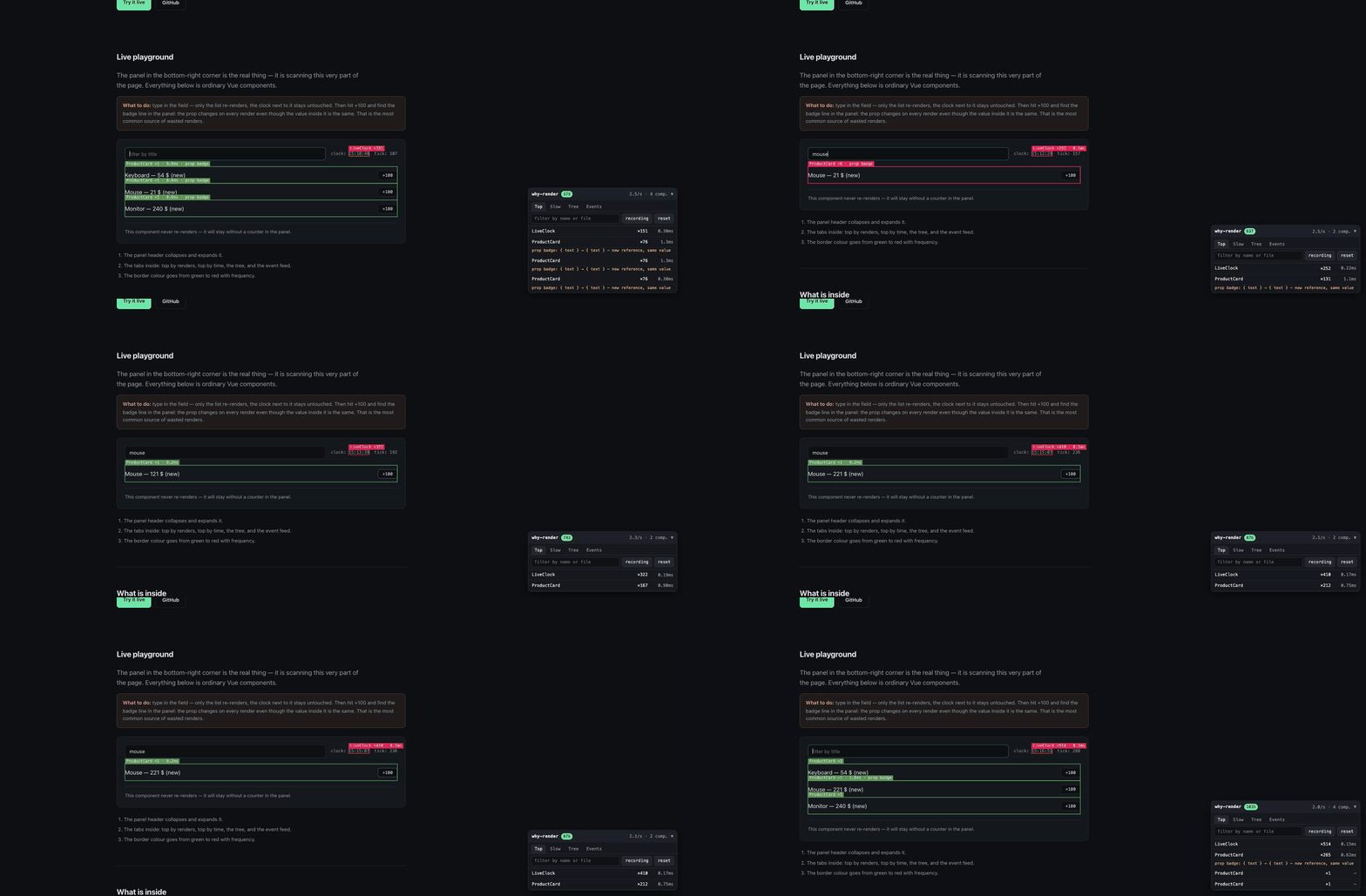
Other tools flash a border around a component that just updated. That is enough to
notice a problem, but not to fix it — you are still left asking what actually changed?
vue-why-render answers that: it names the exact reactive dependency that triggered
the render.
ProductCard ×7 · 2.4ms · badge
└─ prop badge: { text } → { text } — new reference, same value
In React you have to guess this by diffing props. Vue hands you the reason itself,
through the renderTriggered hook — this package is built around it.
Features
- The reason, not just the fact: the name of the prop, ref, Pinia store field or array index, plus the old and new value.
- A dedicated "new reference, same value" verdict — by far the most common source of wasted renders.
- Overlay: a border around the re-rendered component, coloured from green to red by frequency.
- Panel: top by render count, top by time, a component tree with per-subtree totals, and an event feed.
- Jump to your editor: clicking a row opens the SFC in your IDE through the dev server.
- Pinia: which store, which field, and which action was running —
store cart.items (add) · action add(). Nothing to configure, no dependency on Pinia. - Vue Router: a navigation is named by what changed —
route params.id: "/p/1" → "/p/42"— with a hint when a component re-renders on every navigation. - Pause, reset and filter by component name or file path;
Alt+Shift+Ppauses from the keyboard. The panel can be dragged anywhere, follows the system light or dark theme, and copies a reason in one click. - Vue DevTools: an inspector and a timeline layer in the extension, without adding a dependency.
- Nuxt DevTools: a Why render tab with the same live panel, from the Nuxt module, without a dependency.
- Render assertions in tests:
expectRenders(ProductCard).toBe(0, …)— a wasted render you fixed once stops coming back. - Hints: next to the reason, what to do about it — hoist the object, move the handler into a method, consider
v-memo. - Reports: save the whole session as JSON from the panel, and
diffReports(before, after)to prove a fix actually worked. Open a saved report back in the panel, copy the session as Markdown for an issue, orprintReport()to the console. - Render budgets:
budgets: { maxRenders: 5 }warns when a component thrashes, andwindow.__VUE_WHY_RENDER__lets a Playwright test fail CI on it. - API:
getStats(),getEvents(),getReport()and anonRendercallback, so you can build your own tooling. - Powered by Rust/WASM: hot-path algorithms run in WebAssembly — no GC pauses, predictable latency, so the tool itself does not distort the measurements it reports. Falls back to JS transparently when WASM is unavailable.
Install
npm install -D vue-why-render
pnpm add -D vue-why-render
yarn add -D vue-why-render
bun add -d vue-why-render
Requires Vue 3.3+. The package has no runtime dependencies.
From GitHub, without npm
If installing from the registry is not an option, the tarball attached to every release installs from a direct link and needs no authentication:
npm i -D https://github.com/dadashi44/vue-why-render/releases/download/v0.6.0/vue-why-render-0.6.0.tgzUsage
Vue
import { createApp } from 'vue'
import VueWhyRender from 'vue-why-render'
import App from './App.vue'

const app = createApp(App)

app.use(VueWhyRender, {
    exclude: [/^RouterLink/, /^Transition/],
})

app.mount('#app')
Nuxt
Add the module. It registers a client-only plugin in development and leaves nothing behind in a production build — not even the import:
// nuxt.config.ts
export default defineNuxtConfig({
    modules: ['vue-why-render/nuxt'],
    whyRender: {
        exclude: [/^RouterLink/, /^Transition/],
        includeMounts: true,
    },
})
Every option from the table below works under the whyRender key, except
onRender — a callback cannot be carried from nuxt.config into the generated
plugin. If you need one, register the plugin by hand (below). Functions passed to
include or exclude are dropped for the same reason and reported in the terminal;
regular expressions and strings survive.
Nuxt DevTools
The module adds a Why render tab to Nuxt DevTools — the same panel, live, filling the
whole tab, next to the other tools. Checked with DevTools 3.4; DevTools 4.0 (in beta) still collects module tabs through
the same hook. It adds no dependency: the tab is a page the dev server serves, and the panel inside it is
drawn by your app's own Vue through window.__VUE_WHY_RENDER__.
If the floating panel is in the way, keep only the tab:
whyRender: { panel: false },        // the DevTools tab still works
whyRender: { devtoolsTab: false },  // or the other way round
devtoolsTab exists only in nuxt.config: the tab is registered by the build, not by
the app.
By hand, without the module
// plugins/why-render.client.ts — the .client suffix keeps it out of SSR
import VueWhyRender from 'vue-why-render'

export default defineNuxtPlugin((nuxtApp) => {
    nuxtApp.vueApp.use(VueWhyRender)
})
Note that this variant ships in the production bundle unless you strip it yourself — see Cost. The module exists precisely to make that impossible to forget.
Manually, without the plugin
import { scan } from 'vue-why-render'

const handle = scan(app, { panel: false })

handle?.pause()
handle?.getStats()
handle?.stop()
Options
| Option | Default | What it does |
|---|---|---|
enabled | true | Turns the scanner on. The package never guesses the build mode — see Cost. |
overlay | true | Borders around re-rendered components. |
panel | true | Floating statistics panel. |
devtools | true | Register an inspector and a timeline layer in Vue DevTools. |
showLabels | true | Component name label on the border. |
includeMounts | false | Report first mounts as well as updates. |
trackReasons | true | Collect reasons through renderTriggered. |
trackProps | true | Diff props between updates. |
include | [] | Watch only these components: a string, a regexp or a function. |
exclude | [] | Leave these components alone. Beats include. |
minDuration | 0 | Ignore updates faster than this, in ms. |
hotThreshold | 5 | How many renders per second count as "hot". |
maxEvents | 500 | Size of the ring buffer of events. |
flushInterval | 250 | How often the panel pulls a fresh snapshot, in ms. |
displayDuration | 600 | How long a border stays visible, in ms. |
openInEditorUrl | /__open-in-editor?file={file} | Template for the open-in-editor link. |
locale | 'en' | Panel language: en, ru or zh-CN. |
theme | 'auto' | Panel theme: auto follows prefers-color-scheme, or force dark / light. |
pauseHotkey | 'Alt+Shift+P' | Shortcut that pauses and resumes recording, even with the panel off. false binds nothing. |
sampleRate | 1 | Share of renders to record, 0–1. On apps with thousands of components 0.1 keeps every tenth and skips the rest of the work. Counts become sampled — the panel header and the report say so. |
budgets | [] | Render budgets, see Budgets. |
pinia | true | Recognise Pinia stores and the actions that change them. Pinia does not have to be a dependency. |
router | true | Recognise Vue Router navigation and name what changed in the route. The router does not have to be a dependency. |
onBudgetExceeded | — | Called on the first violation of each component. |
onRender | — | Callback fired on every render event. |
Vue DevTools
If the extension is installed, the package registers itself there as well: a Why render inspector next to the component tree, and a Why render layer on the timeline with one event per render.
The inspector lists components by render count; selecting one shows the reason for its last render, the prop diff and the hints. Nothing to configure — it appears when DevTools is open, and costs nothing when it is not.
app.use(VueWhyRender, { devtools: false }) // if you only want the own panelIf the inspector does not show up, the usual reason is not this package.
Vue DevTools has a High Performance Mode, and while it is on, no third-party
inspector is created at all — not this one, not Pinia's, not the router's. The gate
lives in @vue/devtools-kit:
if (devtoolsState.highPerfModeEnabled && !options?.inspectingComponent) returnTurn it off in the Vue tab settings and reload the page. The second condition is simply that the Vue tab has to be open: plugins are instantiated when the DevTools client connects, and until then the registration sits in a queue.
The own panel is not replaced by this and is not going anywhere. The extension is not installed everywhere — a locked-down environment, someone else's browser during a demo, a webview. The panel works where DevTools is absent; DevTools is more convenient where it is present.
No new dependency. The usual way in is @vue/devtools-api, which in version 8
pulls @vue/devtools-kit behind it. The whole integration point is one event on
window.__VUE_DEVTOOLS_GLOBAL_HOOK__, so it is inlined — about twenty lines, and the
package still has zero runtime dependencies.
Render assertions in tests
The scanner counts renders, so it can be pointed at regressions: a wasted render you fixed once stops coming back.
import { mount } from '@vue/test-utils'
import { expectRenders, renderTracking, stopRenderTracking } from 'vue-why-render/test'

afterEach(() => stopRenderTracking())

it('the card does not re-render while filtering', async () => {
    const wrapper = mount(App, { global: { plugins: [renderTracking()] } })

    await expectRenders(ProductCard).toBe(0, async () => {
        await wrapper.find('input').setValue('mouse')
    })
})
When the assertion fails it does not just report a number — it says why:
[vue-why-render] expected ProductCard to re-render 0 time(s), but it re-rendered 1 time(s)
reasons:
- prop badge: { text } -> { text } (new reference, same value)| Helper | What it does |
|---|---|
renderTracking(options?) | A Vue plugin for global.plugins. mount() creates the app itself, so a plugin is the only way in. |
expectRenders(target).toBe(n, action) | Exactly n re-renders during the action. |
expectRenders(target).toBeAtMost(n, action) | No more than n, for cases where an exact number is brittle. |
recordRenders(action) | The raw RenderEvent[] for the window — build your own assertions. |
stopRenderTracking() | Call it in afterEach, or the tracker outlives the test. |
target is a component, its name, or a regular expression.
Two things are decided for you and cannot be surprising: the panel and the overlay are off, so they never touch the DOM your test queries; and mounts are not counted, because a first render is never the wasted one.
The helper waits for nextTick after the action — Vue updates asynchronously, and
without it every assertion would see zero renders and pass for the wrong reason.
Budgets
Say how often a component may re-render, or how long an update may take, and the scanner tells you the moment it does not hold:
app.use(VueWhyRender, {
    budgets: [
        { maxRenders: 5, per: 1000 },                     // any component, 5 renders a second
        { include: [/^ProductCard$/], maxDuration: 16 },  // one frame per update
    ],
})
[vue-why-render] budget exceeded: ProductCard rendered 12 times in 1000ms (limit 5) — last reason: prop badge: { text } → { text } — new reference, same valueThe window is per instance: the question is "is this component thrashing?", not "how
many rows does the list have". The console hears about each component and kind of
violation once; after that only the count and the worst value grow. The panel paints
the render count of an offender red, and violations go into the report, the Markdown
block and printReport().
Failing CI
A Playwright test cannot import the page's modules, so the scanner puts a small handle
on window.__VUE_WHY_RENDER__ — getReport(), getViolations(), printReport(),
pause(), resume(), reset(). Run the app in dev mode, where the scanner is on:
test('the catalog stays within its render budget', async ({ page }) => {
    await page.goto('/catalog')
    await page.getByRole('searchbox').fill('mouse')

    const violations = await page.evaluate(() => window.__VUE_WHY_RENDER__?.getViolations() ?? [])
    expect(violations).toEqual([])
})
The handle is removed by stop(). For component tests, use
render assertions instead.
Hints
Next to the reason, the panel prints what to do about it:
ProductCard ×7
prop badge: { text } → { text } — new reference, same value
💡 badge: looks like this object is rebuilt in the parent — hoist it into a constant or a computed
Four patterns are recognised, all of them from runtime data alone:
| What the data shows | The hint |
|---|---|
| A prop changed by reference only, the value is equal | the object is rebuilt in the parent — hoist it |
| A prop is a function and it is a different one every render | the handler is recreated — move it into a method |
| The component re-rendered with no reasons and no prop changes | the parent drove it — a candidate for v-memo |
| The reason is a route change | reading the route subscribes to every navigation — wrap the one field in computed |
Hints are hypotheses, not diagnoses. The package knows a prop arrived as a new reference; it does not know where from — an inline call in the template, a computed without memoisation, or a store. That is why the wording hedges, and why a hint is never printed when it cannot be derived honestly:
trackProps: falseortrackReasons: false— "nothing changed" would mean "we were not looking", so nov-memohint;- a component that only ever mounted gets no hint at all: suggesting memoisation for something that never updated is worse than saying nothing.
Hints are also attached to every component in a saved report, under hints.
Reports
Press report in the panel to save the whole session as JSON, or call the API:
const report = handle.getReport()   // a plain serialisable object
handle.saveReport()                 // the same thing, downloaded as a file
The file carries the package and Vue versions, the URL, the session length and the scanner options alongside the numbers. Those are not decoration: without them a report from someone else is unreadable, because there is no way to tell whether a component never re-rendered or was simply filtered out.
Opening a saved report
Press open in the panel, or drop a report file onto it. The panel switches to that report — the same tabs, filter, hints and budget marks — with a bar on top saying whose session it is and a back to live button. The live session keeps recording in the background, so nothing is lost. report and md act on the open report.
The component tree is not stored in reports, so the Tree tab says so instead of showing a flat list that would look like a tree with no children.
Printing to the console
When the panel is off or in the way, print the session as a table:
import { printReport } from 'vue-why-render'

printReport()                       // the running session
printReport(parseReport(json))      // any saved report
handle.printReport({ limit: 10 })
reportRows(report) returns the same rows as plain objects, if you want them elsewhere.
Pasting into an issue
Press md in the panel to copy the session as Markdown — top renders, the slowest components, the most frequent reasons and the hints, as tables that render right in the thread. Nothing to download or attach:
import { formatReportMarkdown } from 'vue-why-render'

const markdown = formatReportMarkdown(handle.getReport(), { limit: 10 })
The page URL is deliberately left out: an issue is public, and a URL can carry an internal host or a token in the query. The JSON report still has it.
Comparing two reports
Every other tool shows you a state. This one answers the question you actually have after an optimisation — did it help?
import { diffReports, formatDiff, parseReport } from 'vue-why-render'

const diff = diffReports(parseReport(before), parseReport(after))
console.log(formatDiff(diff).join('\n'))
total ×19 → ×11 -42%
ProductCard ×9 → ×1 -89% reason gone: props:badgeComponents are matched by file::name, not by uid — a uid lives for one session
and means nothing across two. Several instances of the same component are therefore
compared as one aggregate.
diff.components is ordered with regressions first: a render count that grew after
an "optimisation" is what you are looking for, not the one that shrank.
The diff refuses to lie by omission. When two reports are not comparable it says
so in diff.warnings, and formatDiff prints those lines first:
- the sessions differ in length — compare
beforePerSecond/afterPerSecondinstead of raw counts; include/excludediffer — the two runs watched different components;includeMountsorminDurationdiffer — the two runs counted different events;- the reports came from different versions of the package.
A silent "−80%" that came from changing a filter is worse than no diff at all.
Pinia
When the reason is a store, the panel says which store, which field, and which action was running at the time:
CartSummary ×3 · 0.2ms
├─ store cart.items: Array(1) → Array(0) · action clear()
└─ store cart.total: 2100 → 0 · action clear()
Nothing to configure: the package finds Pinia on the app by itself, in whatever order
app.use(pinia) and the plugin were called, and works with Pinia 2, 3 and 4 without
depending on any of them.
Why this needs work at all: Vue reports the object a change happened on, and for a
store that object is never the store. cart.count++ fires on the state object,
cart.items.push() on the array, a setup store's ref on the ref itself — and none of
them knows which store it belongs to. So the package keeps an index of where every
object of every store's state sits. A lookup is a single WeakMap read, and when a new
object is put into a store (push({ … }), cart.current = { … }) its subtree is added
to the index right away.
- The action comes from
$onAction. An async action counts as running until it settles, so a change after anawaitis still attributed to it; in nested calls the innermost action wins. A direct assignment or$patchfrom a component has no action, and the panel does not invent one. - Adding to or removing from an array in a store is reported as the array itself —
store cart.items (add)— not ascart.items[7]: everypushhas its own index, and the diff, the frequency table and the budgets would see a new reason each time. - Limits. The index goes four levels deep and up to 500 nodes per store. The tail of a huge array in a store shows up as an ordinary array change, without the store name.
pinia: false turns it all off.
Vue Router
A navigation is named by what changed in the route, not reported as a ref that swapped one route object for another:
ProductPage ×3 · 1.2ms
└─ route params.id: "/p/1" → "/p/42"
Params, query and hash are named by key — params.id, query.tab, hash — because
the parameter is the cause and the path is only its consequence. path shows up only
when nothing else changed, that is, when the page itself did. The values are the full
paths before and after, so you see both what changed and where from. The key does not
carry the values, so for the report diff and the budgets every navigation of
params.id is the same reason.
The hint. useRoute() and $route both read one ref, so a component that touches
any field of the route re-renders on every navigation — a header that only shows the
path re-renders when the query changes. The panel says so, and suggests the fix: if one
field is enough, computed(() => route.params.id) re-renders only when that field
changes. Which fields a component reads is not visible at runtime, so the wording is a
suggestion, not a verdict.
Works with Vue Router 4 and 5 without depending on either. router: false turns it off.
How the reason is determined
A global mixin attaches renderTriggered to every component. Vue passes it
{ target, type, key, oldValue, newValue } — the object, the key, and the values before
and after. From there the package translates it into plain language:
target === instance.props→ a prop;- the target lives in the state of a Pinia store → a store with the path inside it (
cart.items,cart.meta.open), see Pinia; - the target is a ref and the key is
value→ look up the variable name insetupStateand report state count instead of a uselessvalue; - an array →
[3]; aMaporSet→ a collection; - the target is the router's current route → a route change, named by what changed (
params.id,query.tab), see Vue Router; - no target at all → a computed. Vue 3.5 notifies a component about a computed without any debug info, so the package walks the component's own dependencies for the computeds that just went stale and names them from
setupState— computed total. A computed declared outside the component, in a composable or a store has no name to give, and is reported simply as computed.
Independently of all that, props are diffed between consecutive updates. That is what catches the case where a parent hands down a freshly built literal every time.
Cost
This is a dev-only tool for three reasons, and none of them is an abundance of caution:
renderTriggeredonly fires in a development build of Vue — in production the hook is never called at all.- The callback runs on every reactivity trigger. If you are profiling timings specifically, set
trackReasons: false. - The global mixin adds hooks to every component in the application.
renderTracked — which fires on every read of a reactive value — is deliberately not
used: that is thousands of calls per second, and nothing left to profile.
Switching the scanner off in production is the caller's job. The package makes no
attempt to guess the build mode: process is not available in a browser bundle, and a
bare reference to process.env.NODE_ENV breaks the consuming application's production
build — @rollup/plugin-commonjs mistakes such an ESM file for mixed CommonJS and
rewrites it into syntactically broken code. So the scanner is simply on by default.
The right way is a static bundler flag, which strips both the call and the import itself:
// Vite
if (import.meta.env.DEV) {
    const { default: VueWhyRender } = await import('vue-why-render')
    app.use(VueWhyRender)
}
On Nuxt, use the module — modules: ['vue-why-render/nuxt']. It does this for you:
in a production build it registers no plugin at all, so there is nothing left to strip.
That is the whole reason it exists.
WASM engine
Since 0.7.0 the hot-path algorithms — buildTree, aggregateComponents, dedupeReasons
and diffReports — are compiled from Rust to WebAssembly. The WASM binary is inlined in
the bundle and loaded lazily on the first scan() call; if WebAssembly is unavailable
(SSR, jsdom, restrictive CSP) the package falls back to the original JS implementations
transparently.
Why not just JS?
A profiling tool that allocates objects on the JS heap is measured by the same GC that
measures your application. A major GC pause during a buildTree call inflates the
reported render time — the tool distorts its own measurements.
WASM linear memory is a single ArrayBuffer to V8. The garbage collector never scans
inside it, never pauses it, and Rust frees memory deterministically through ownership.
The result: more predictable latency for the tool, more accurate numbers for you.
Benchmarks
Measured in Chrome 131 on Apple M3 Pro, buildTree with randomised component trees:
| Components | JS avg | WASM avg | JS max | WASM max | JS jitter | WASM jitter |
|---|---|---|---|---|---|---|
| 100 | 0.03 ms | 0.02 ms | — | — | — | — |
| 500 | 0.05 ms | 0.04 ms | — | — | — | — |
| 1 000 | 0.10 ms | 0.10 ms | 2.3 ms | 0.3 ms | — | — |
| 5 000 | 0.50 ms | 0.43 ms | 3.2 ms | 1.5 ms | 2.9 ms | 1.2 ms |
Under GC pressure (heavy short-lived allocations alongside the call):
| Components | JS p99 | WASM p99 | JS max | WASM max |
|---|---|---|---|---|
| 5 000 | 1.0 ms | 0.9 ms | 1.3 ms | 1.0 ms |
Raw throughput gains are modest (1.1–1.8×) because the serialization boundary
(serde-wasm-bindgen) dominates at larger sizes. The real win is tail-latency
stability: WASM max is 2× lower and jitter (max − min) is 2.4× tighter. For a
measurement tool, consistent overhead matters more than average speed.
API
import { loadWasm, isWasmReady, wasmVersion } from 'vue-why-render'

await loadWasm()        // explicit preload (scan() does this automatically)
isWasmReady()           // → true | false
wasmVersion()           // → "0.1.0" | null
If WASM fails to load, a single console.warn is emitted and every call silently
uses the JS fallback. No user code needs to change.
Opening files in your editor
Clicking a row in the panel asks the dev server to open the file. The package does
not pick the editor — that is done by launch-editor
on the Vite or Nuxt side, and by default it guesses.
The guess is VS Code. If the code command is not in your PATH you get this in the
terminal and nothing opens:
The editor process exited with an error: spawn code ENOENT
('code' command does not exist in 'PATH').
Name your editor explicitly — in the project .env, or in your shell profile to
cover every project at once:
LAUNCH_EDITOR=webstormRecognised values include code, cursor, webstorm, idea, phpstorm,
goland, rubymine, pycharm, sublime, atom, vim and emacs. The matching
CLI launcher has to exist — JetBrains IDEs install theirs through Toolbox, VS Code
through Shell Command: Install 'code' command in PATH.
Restart the dev server afterwards.
The endpoint itself is found automatically: the package tries the configured
openInEditorUrl, then Vite's /__open-in-editor, then Nuxt's
/__nuxt_devtools__/open-in-editor. If none of them answers, it prints a hint to
the browser console once per session.
Compared to other tools
| Feature | vue-why-render | Vue DevTools | Chrome DevTools (Performance) |
|---|---|---|---|
| Shows which component re-rendered | yes | yes (highlight) | no |
| Names the exact prop / ref / store field | yes | no | no |
| "New reference, same value" verdict | yes | no | no |
| Pinia: store + field + action | yes | partial (store only) | no |
| Vue Router: names the changed param | yes | no | no |
| Render assertions in tests | yes | no | no |
| Render budgets (CI-friendly) | yes | no | no |
| Save / diff / compare reports | yes | no | no |
| Actionable hints (what to fix) | yes | no | no |
| Flame graph / CPU profile | no | yes | yes |
| Memory profiling | no | no | yes |
| Works in production | no | yes | yes |
Vue DevTools shows that a component updated, but not which dependency caused it.
You still need to bisect props or add watch calls to find the trigger.
vue-why-render tells you the trigger directly — it is a debugging tool, not a
general profiler.
Chrome Performance tab profiles CPU time, paints and layout. It cannot tell you
that ProductCard re-rendered because badge is a new object with the same value.
Use both: Chrome for where the time went, this package for why it happened.
FAQ
How do I find and fix unnecessary re-renders in Vue 3?
Install vue-why-render as a dev dependency. It hooks into Vue's renderTriggered
and names the exact reactive dependency — a prop, ref, computed or Pinia store
field — that caused each re-render. The most common cause is passing a new object
reference that carries the same value (e.g. an inline { text } in a template); the
package detects this and labels it "new reference, same value".
Does it slow down my app?
The scanner runs renderTriggered callbacks, which Vue only fires in development
builds. In production, the hooks are never called — zero cost. The hot-path
algorithms run in WebAssembly (Rust) to minimise overhead during profiling, with a
JS fallback when WASM is unavailable.
Does it work with Pinia?
Yes. When a Pinia store field triggers a render, the panel shows the store name,
the field, and which action was running: store cart.items (add) · action add().
No configuration needed, no dependency on Pinia.
Does it work with Vue Router?
Yes. A navigation is named by what changed — route params.id: "/p/1" → "/p/42" —
instead of showing the full route object. If a component re-renders on every
navigation (because it reads the whole route), a hint warns about it.
Does it work with Nuxt?
Yes. Add modules: ['vue-why-render/nuxt'] to your Nuxt config. A Why render
tab appears in Nuxt DevTools with the live panel. The module auto-disables in
production builds.
Can I use it in CI / automated tests?
Yes. The package exports expectRenders(Component).toBe(n, ...) for Vitest, and
render budgets (budgets: { maxRenders: 5 }) that expose violations through
window.__VUE_WHY_RENDER__ for Playwright. A wasted render you fixed once never
comes back.
Why WebAssembly?
A profiling tool that allocates on the JS heap is subject to the same garbage
collection pauses as the code it measures. A GC stop-the-world pause during a
buildTree call inflates the reported render time — the tool distorts its own
measurements. WASM linear memory is invisible to the garbage collector: no GC
scanning, no pauses, deterministic memory management via Rust ownership. The result
is 2× lower worst-case latency and 2.4× less jitter compared to the JS path.
What this package does not do
- It does not replace Vue DevTools flame graphs or browser traces: it shows what re-rendered and why, not where the time went inside a render.
- It does not work in production.
- It does not support Vue 2.
Development
npm install
npm run dev        # playground with demo components
npm run dev:site   # landing page with the same playground inside
npm run build:site # build the site into dist-site
npm test           # vitest
npm run test:coverage
npm run test:e2e   # playwright, the panel in a real browser
npm run typecheck  # vue-tsc
npm run lint
npm run build
Tests mount real Vue applications in jsdom and cover the whole path: from a ref changing
to the registry recording it with the correct reason. The overlay is verified against a
stubbed 2d context, the panel through @vue/test-utils.
What jsdom cannot do by design — layout and dragging, a real keyboard, the clipboard, picking
a file, prefers-color-scheme — is covered by Playwright in e2e/ against a small fixture
app. Logic is not duplicated there: it stays in the unit tests.
CI runs lint, types and tests on Node 20/22/24, separately verifies installation and building under pnpm, yarn and bun, and then installs the packed tarball into a clean project with each of the four managers, exercising both the ESM and the CJS entry point.
Releases go to npm on a v* tag through trusted publishing: there are no tokens in
repository secrets — npm exchanges the Actions OIDC token for one-time credentials and
attaches provenance itself.
Contributing
Bug reports, ideas and pull requests are welcome — see CONTRIBUTING.md for the development setup and what a pull request should include.
License
MIT