vue-neshan-maps
Vue Neshan Maps
Bring your places to life.
Reactive maps for Vue 3 · MapLibre + Leaflet · TypeScript


English · فارسی
Try the live demo · دموی فارسی
Get started · Feature guide · API reference · Examples · Nuxt 4
Developer documentation · Bilingual guides, complete API reference and interactive examples.
Package name: vue-neshan-maps. Existing users: migration and legacy compatibility. Future feature releases are published as vue-neshan-maps. The repository is now sajadjanat/vue-neshan-maps, with the demo at the matching GitHub Pages address.
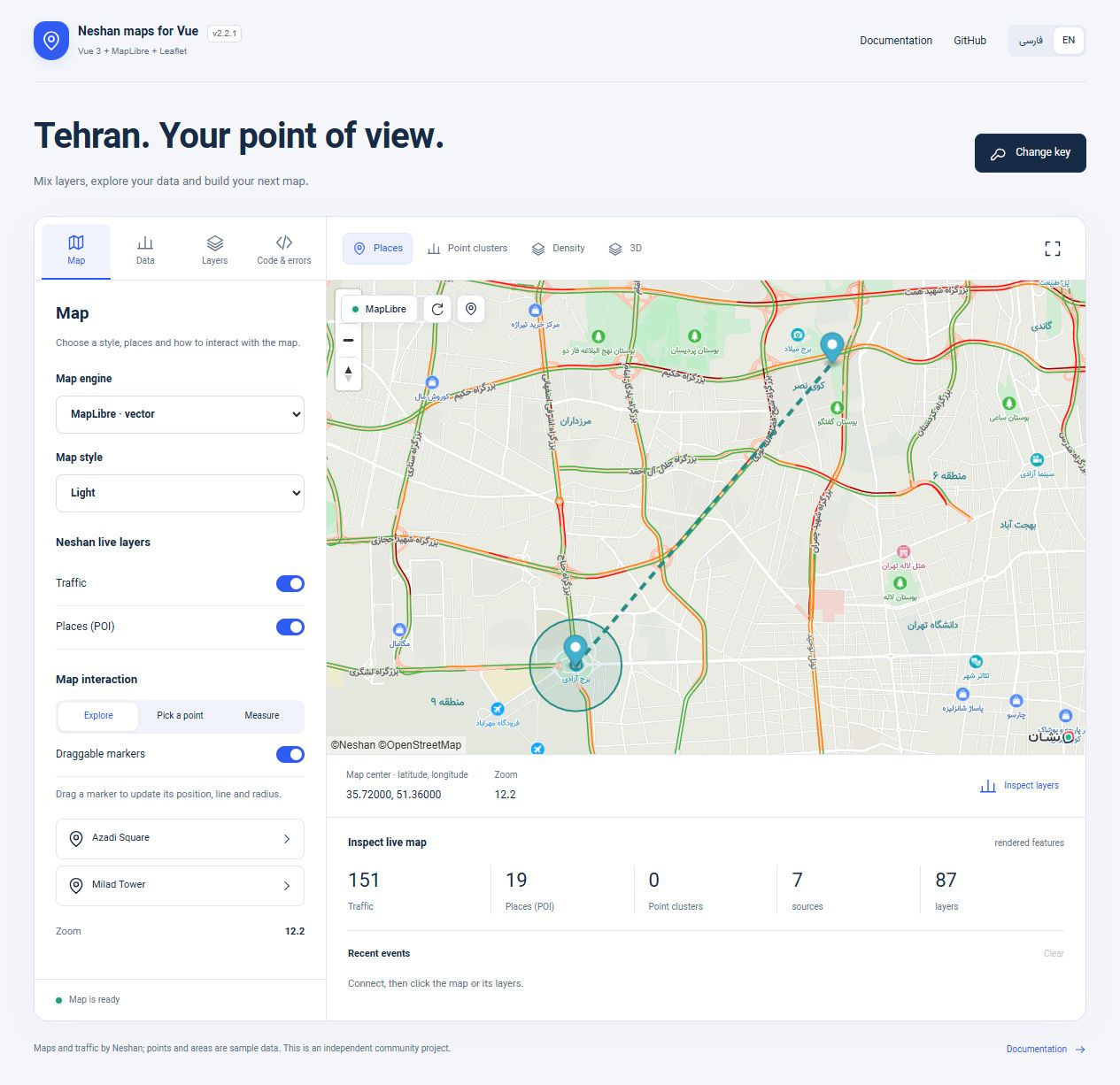
Real Neshan basemap and live layers. Markers, the service area and the dashed connection are sample application data. The interface illustrates what you can build; the component supplies the map.
Build a location picker, show your branches, outline a delivery area or add live traffic to your app. Two Vue components connect Neshan's renderers to reactive state, with typed overlays, lifecycle events and native access when you need it. A community library, independent of Neshan.
The online playground lets you try clusters, weighted heatmaps, 3D layers, editable GeoJSON, styles, markers, point picking and distance measurement. Enter your own web key with sajadjanat.github.io allowed in Neshan. The key stays in page memory; it is not saved or included in links. Error simulations make no network requests. Demo guide.
One library, two engines
| Build with | What you get |
|---|---|
| Vue models | Keep center and zoom in sync; pick a point and persist dragged markers. |
| Live vector layers | Traffic and POI on MapLibre, five map styles and reactive visibility. |
| Your geography | Markers, text popups, tooltips, lines, polygons, meter-radius circles and GeoJSON. |
| Spatial analysis | Automatic point clusters, weighted heatmaps, custom sources/layers and 3D extrusion. |
| Application controls | Fly to a place, frame markers, request browser location and access the native renderer. |
| Lifecycle handling | Lazy SDK initialization, loading/error slots, retry, automatic resize and cleanup. |
Find your way
| I want to… | Read |
|---|---|
| Display my first map | Quick start |
| Pick an address, add places or draw a service area | Feature guide |
| Copy a complete Vue component | Runnable examples |
| Check a prop, event, slot or method | API reference |
| Use Nuxt, native APIs or migrate from 1.x | Integration guide |
| Diagnose blank tiles or missing traffic | Troubleshooting |
| Cluster points, draw a heatmap or add advanced layers | Advanced MapLibre guide |
Choose an engine
NeshanMapLibre | NeshanMapLeaflet | |
|---|---|---|
| Renderer | Vector / WebGL | Raster / DOM |
| Renderer / connector | MapLibre 6.14.0 / adapted Neshan connector | Leaflet 1.9.4 / Neshan SDK 1.0.8 |
| Live traffic / POI | Supported with compatible styles | No longer updated by Neshan; ignored with warnings |
| Styles | Light, dark, monochrome light/dark, pastel; custom version-8 style | dreamy, standard-night; vendor-supported tile URLs |
| Component coordinates | [latitude, longitude] | [latitude, longitude] |
| Native options | MapLibre options | Leaflet options |
| Use case | New vector maps and live layers | Existing Leaflet applications/plugins |
Quick start
Requires Vue 3.5.43+. Tooling: Node 22.12+ within 22.x, or Node 24+. MapLibre needs a modern browser with WebGL and DecompressionStream.
Install from npm:
npm install vue-neshan-maps@^2.3.0Create a domain-allowed web key in the Neshan dashboard. For Vite, put it in your ignored .env.local:
VITE_NESHAN_WEB_KEY=web.YOUR_DOMAIN_ALLOWED_KEYWeb keys are visible in browsers by design; restrict their allowed domains. Service keys belong on your server, never in public Vue environment variables. Search, geocoding and routing services are not included in this package.
<script setup lang="ts">
import { ref } from 'vue'
import { NeshanMapLibre, MAPLIBRE_STYLES, type Coordinates } from 'vue-neshan-maps'
import 'vue-neshan-maps/style.css'

const webKey = import.meta.env.VITE_NESHAN_WEB_KEY
const center = ref<Coordinates>([35.6997, 51.338])
const zoom = ref(13)
const traffic = ref(true)
const poi = ref(true)
</script>

<template>
  <NeshanMapLibre
    v-model="center" v-model:zoom="zoom" :api-key="webKey"
    :map-style="MAPLIBRE_STYLES.light" :traffic="traffic" :poi="poi"
    :pick-on-click="true" :styles="{ height: '500px' }"
  />
  <label><input v-model="traffic" type="checkbox">Traffic</label>
  <label><input v-model="poi" type="checkbox">Places</label>
  <p>{{ center[0] }}, {{ center[1] }} · zoom {{ zoom }}</p>
</template>
Import package CSS once. Both components default to 100% width and a 450px height. centerMarker is a fixed visual center pin, separate from markers.
Leaflet
Use the same center, zoom and webKey setup, import NeshanMapLeaflet instead, then use:
<NeshanMapLeaflet
  v-model="center" v-model:zoom="zoom" :api-key="webKey"
  :options="{ maptype: 'dreamy' }" :pick-on-click="true"
  :styles="{ height: '500px' }"
/>
Try the Leaflet engine in the live demo.
Coordinate order
| API | Order | Example |
|---|---|---|
Component model, marker/shape positions, component flyTo | Latitude, longitude | [35.6997, 51.338] |
GeoJSON, native MapLibre APIs, MapLibre fitBounds | Longitude, latitude | [51.338, 35.6997] |
Leaflet fitBounds | Latitude, longitude | [[35.69, 51.32], [35.73, 51.39]] |
Nuxt 4
Register the module to add both components, composables and package CSS automatically:
export default defineNuxtConfig({
  modules: ['vue-neshan-maps/nuxt'],
  runtimeConfig: { public: { neshanWebKey: '' } },
})
Set NUXT_PUBLIC_NESHAN_WEB_KEY and read it with useRuntimeConfig(). Complete Nuxt 4 guide: module, manual plugin, SSR and production config →
Markers and overlays
For point picking, editable markers, shapes, GeoJSON, native controls and status handling, follow the feature guide. Each section explains what your application owns and what the component updates.
Use unique, stable IDs and persist dragging in application state:
import { ref } from 'vue'
import type { Coordinates, MapLibreMarker, MapCircle, MapPolygon, MapPolyline } from 'vue-neshan-maps'

const markers = ref<MapLibreMarker[]>([
  { id: 'azadi', position: [35.6997, 51.338], popup: 'Azadi Square',
    tooltip: 'Drag to move', options: { draggable: true } },
])
function saveMarker(marker: MapLibreMarker, position: Coordinates) {
  markers.value = markers.value.map(item => item.id === marker.id ? { ...item, position } : item)
}
const circles: MapCircle[] = [
  { id: 'area', center: [35.6997, 51.338], radius: 500, options: { color: '#0f766e', fillOpacity: 0.15 } },
]
const polylines: MapPolyline[] = [
  { id: 'connection', positions: [[35.6997, 51.338], [35.7448, 51.3753]], options: { weight: 4 } },
]
const polygons: MapPolygon[] = [
  { id: 'zone', positions: [[35.70, 51.34], [35.72, 51.34], [35.72, 51.37]], options: { color: '#7c3aed' } },
]
Pass :markers="markers", :circles="circles", :polylines="polylines", :polygons="polygons" and @marker-dragend="saveMarker" to the component. For Leaflet use the MapMarker type. Popup/tooltip strings are plain text. A polyline displays supplied coordinates; it does not calculate a road route.
MapLibre supports native geojsonLayers and geojsonOptions. Shape props support a documented subset of Leaflet-like paint options, not arbitrary Leaflet plugin options. See API details and GeoJSON examples.
Map styles in practice
Light and dark styles use the same component state. Markers and custom overlays survive style changes.
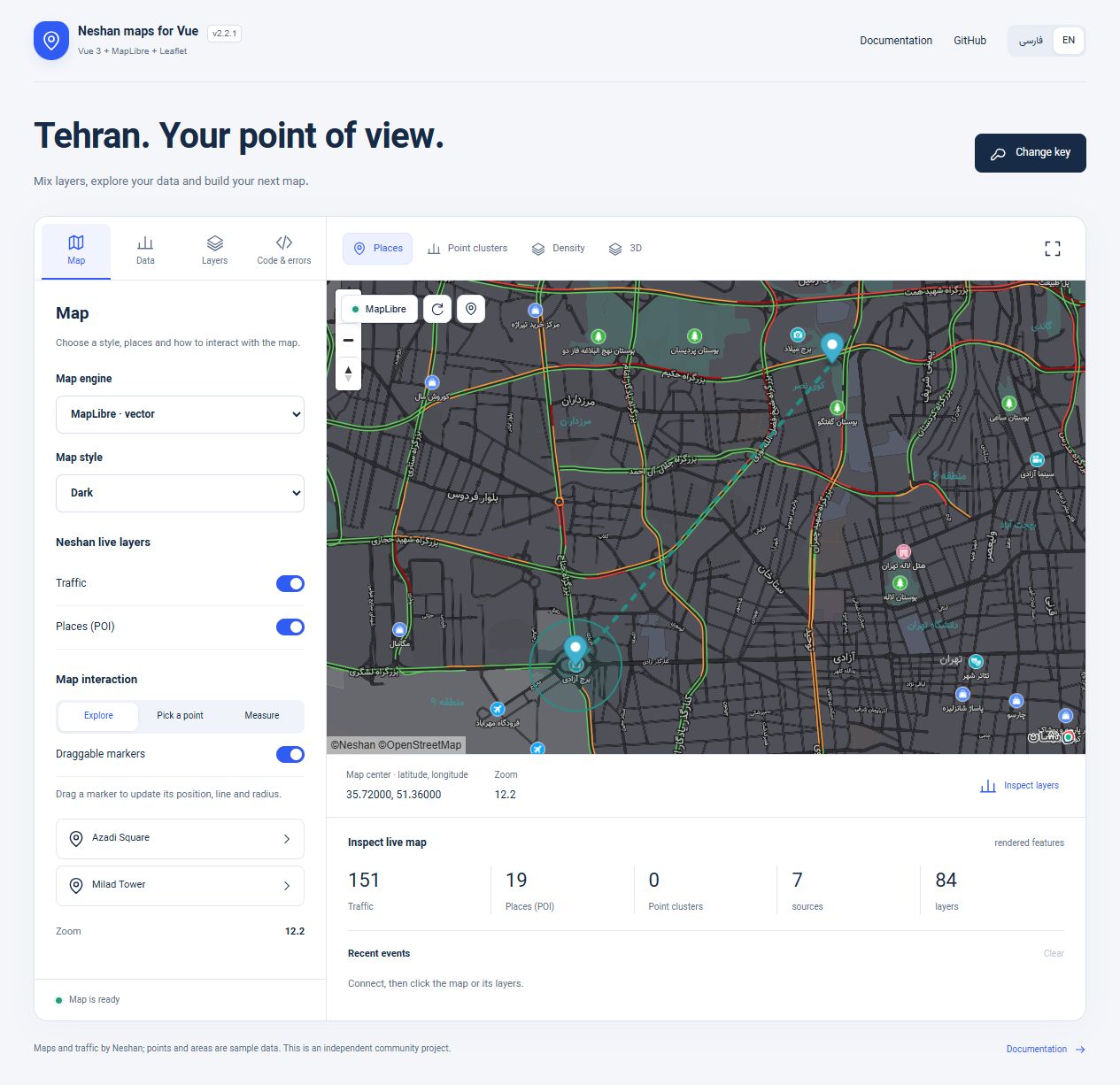
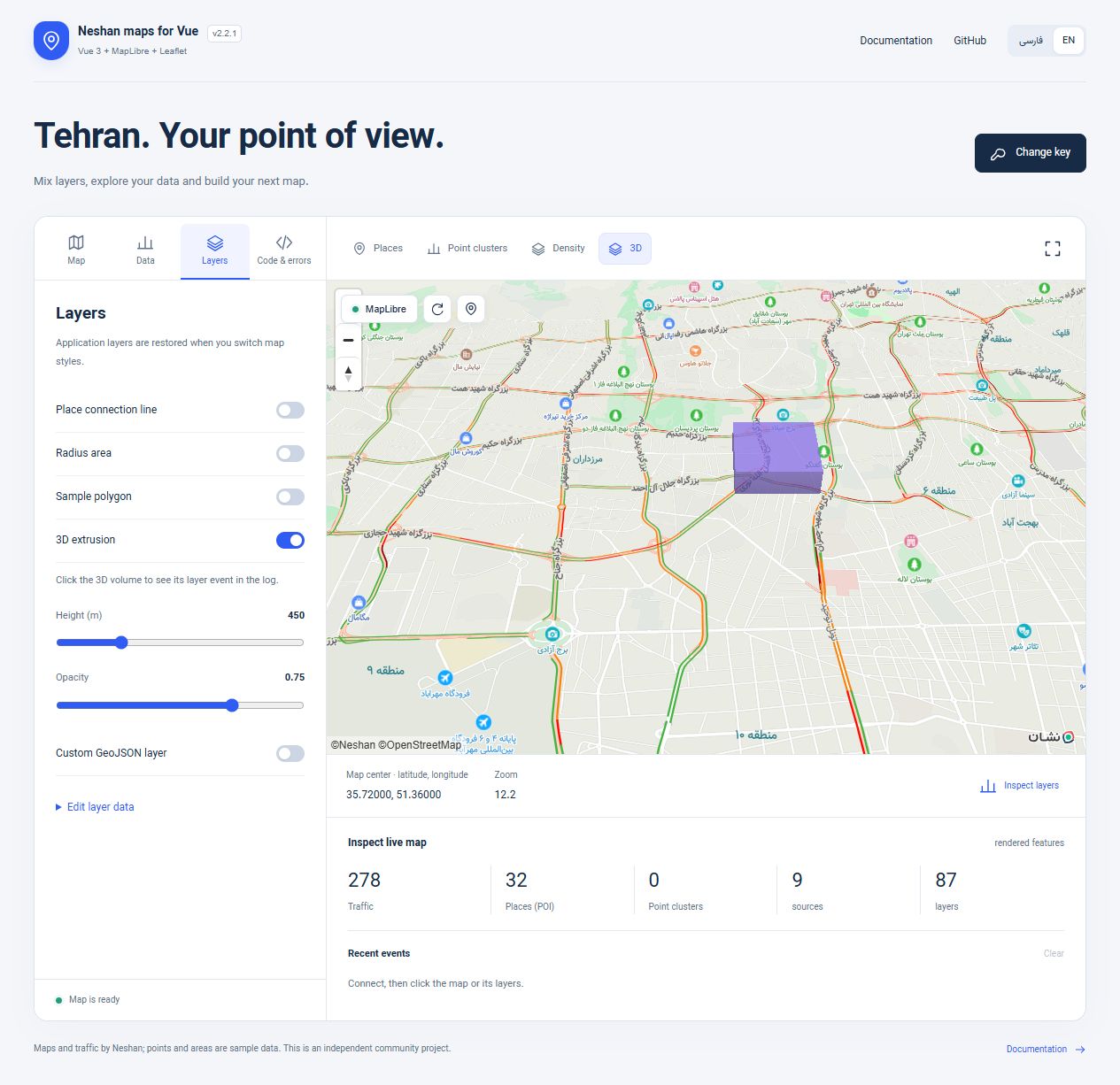
These screenshots are unedited captures of the live bilingual demo. POI density and traffic detail depend on the viewport, zoom, vendor style and available data.
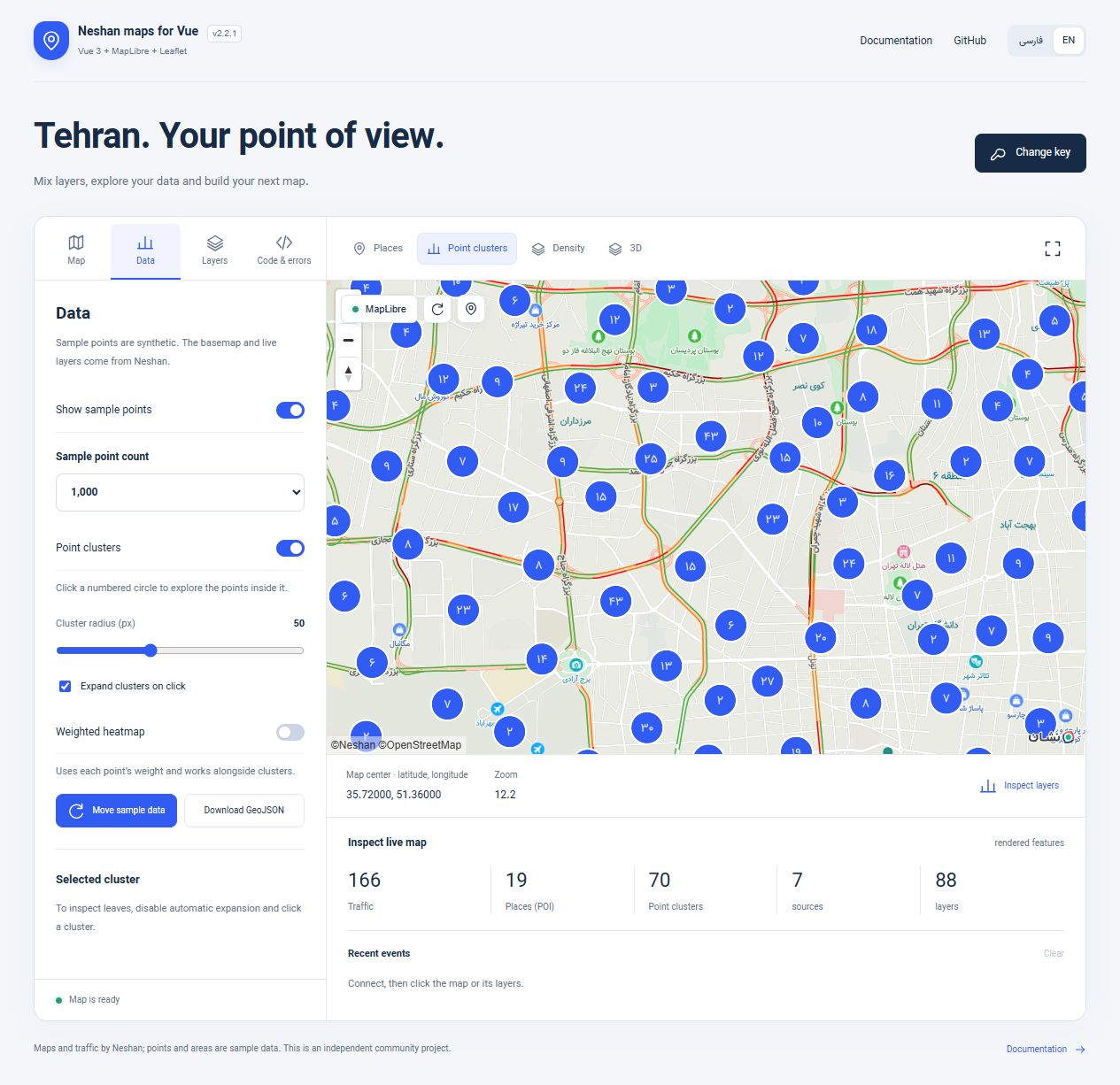
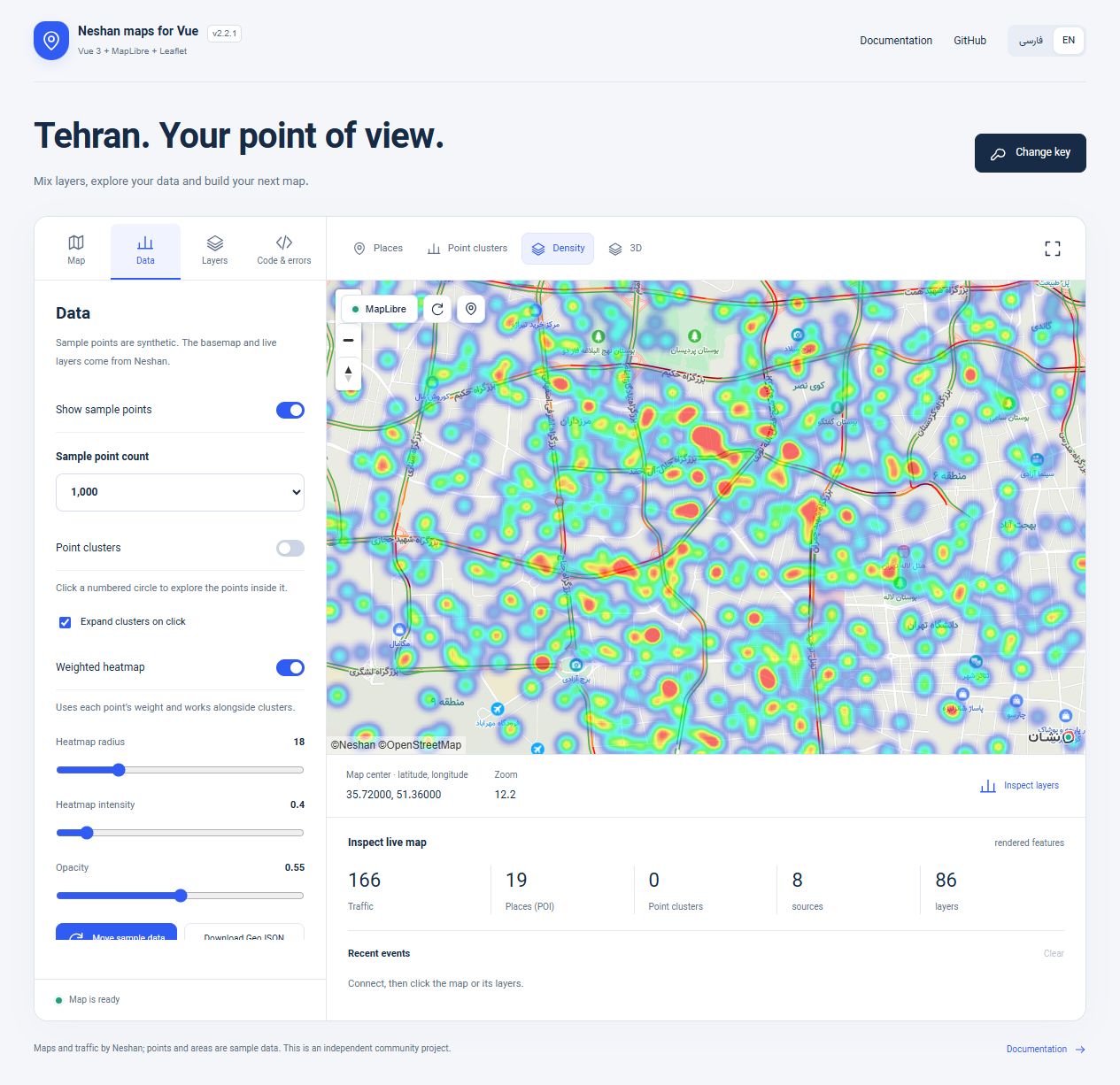
Live demo gallery: clustering, heatmap and 3D
Events, methods and slots
| Purpose | API |
|---|---|
| Native access | ready → { map, maplibre } or { map, L }; destroy clears consumer refs |
| Models | update:modelValue, update:zoom; compatibility latitude, longitude |
| Interaction | click, moveend, zoomend, marker-click, marker-dragend |
| Status | error, warning, tiles-loading, tiles-loaded, tile-error |
| Location | location-found, location-error |
| MapLibre live layers | live-layers → flags and matched layer IDs |
| Ref methods | retry, fitToMarkers, flyTo, fitBounds, invalidateSize, locate |
| MapLibre extras | openPopup(id), getDiagnostics() |
| Slots | loading, error with { error, retry }, tile-error with { state }, center-marker, default native context |
ready confirms initialization, not tile authorization. MapLibre counts source readiness events; Leaflet counts raster tile results, so counts are not comparable. getDiagnostics() reports rendered MapLibre features in the current viewport/zoom, not totals for the dataset.
Use useNeshanMapLibre() or useNeshanMap() in setup and wire both @ready="onReady" and @destroy="onDestroy". The component owns native map disposal. Full payloads, defaults and signatures →
Migration and runtime
- From 1.x: Vue is a peer dependency; import package CSS; replace UMD scripts with ESM/CommonJS. Leaflet
options.key,options.center,latitudeandlongituderemain supported. Prefer explicit key and models. - SSR / Nuxt: imports are SSR-safe; SDK initialization happens on mount. Import CSS globally.
<ClientOnly>is optional. Do not initialize the renderer on the server. - Style updates: MapLibre retains DOM markers/popups and restores custom layers/live visibility after
style.load. Leaflet usessetMapTypewithout replacing the map. - Native options: remount with Vue
:keyto change constructor-only options. Web-key changes rebuild the map; refresh native references onready. - Multiple maps: concurrent Neshan MapLibre maps must use the same page-global key. Leaflet uses a global SDK namespace; mixing versions is unsupported.
- Location: HTTPS or localhost and browser permission are required. Location is only requested when your app calls
locate(). - CSP/custom hosting: Leaflet supports
sdk.scriptUrl,styleUrl,timeout,nonce. MapLibre uses the installed SDK; allow its style/tile/font/worker resources in your CSP. See the API reference.
Troubleshooting
| Symptom | Check |
|---|---|
| Blank map | CSS, height, web key, allowed domain, quota, network; WebGL/DecompressionStream for MapLibre |
| Missing traffic/POI | Use MapLibre and a style containing Neshan traffic / points_source sources/layers; inspect warning and live-layers |
| Marker jumps back after drag | Persist marker-dragend in your markers array |
| Wrong location | Latitude-first props versus longitude-first GeoJSON/native MapLibre |
| Location failure | HTTPS/localhost, permission and device availability; handle location-error |
| Partial Leaflet delivery | Supplemental vendor labels may return HTTP 204 without an image; inspect tile events separately from base-map delivery |
Traffic tiles are re-requested every 60 seconds while enabled; Neshan controls caching/freshness. Vendor availability and quotas are outside this wrapper. Keep required Neshan/OpenStreetMap attribution visible.
Patched renderer: 2.2.0 replaces the vulnerable bundled engine with MapLibre GL JS 6.14.0. Neshan tile/RTL/branding compatibility comes from an adapter-only ISC fork of SDK 5.24.4, maintained by this community package. Attribution sanitization and text popups remain. See security, CSP and compatibility. The release audit reports zero known vulnerabilities; this is a dependency snapshot, not a guarantee about application code.
Playground and contributing
git clone https://github.com/sajadjanat/vue-neshan-maps.git vue-neshan-maps
cd vue-neshan-maps
npm ci
npm run dev
Enter a web key in the playground, or copy .env.example to .env.local. The runtime form does not save the key. Never commit environment files containing credentials.
npm run typecheck
npm test
npm run test:sdk
npm run build
npm run build:demo
npm run test:package
Validation includes 55 unit/contract tests, 10 tests using the actual pinned Leaflet SDK, strict installed-package TypeScript checks and real-map browser checks. Automated SDK tests stub image/quota networking and simulate location callbacks; actual device GPS was not requested. CI covers Node 22 and 24.
For issues, include engine/package/browser versions, a small reproduction and sanitized errors. Never include service keys or account tokens.
Project links
Changelog · Releases · Report an issue
Official references
Neshan MapLibre · Neshan Leaflet · Vue · Leaflet API
MIT © Sajad Abasi. License.
Clusters, heatmap and advanced layers
Version 2.2 adds automatic point clustering, weighted heatmaps, declarative native sources/layers (including 3D extrusion), structured key/quota errors and incremental geometry updates. Complete guide and examples · فارسی.
Vazir font
Vazir 30.1.0 regular and bold are bundled as self-hosted WOFF2 files. The original SIL OFL license and author credits are included in fonts. No font CDN is required.
import 'vue-neshan-maps/fonts/vazir.css'<div class="neshan-font-vazir" lang="fa" dir="rtl">
<!-- Your map, popups and Persian controls -->
</div>The class styles the interface and HTML popups. Vector labels use the Neshan style glyphs; raster labels are part of tile images. This font does not replace either. GitHub controls its Markdown typography; Persian screenshots are captured with Vazir.